

Real3D FlipBook has been a familiar name on CodeCanyon since 2014. We have been in this space for just as long — our original PDF Viewer plugin launched the same year, evolved into a full classic FlipBook plugin, and led to the WebGL-powered TNC FlipBook 3D you see today. If you are weighing your options today, or if you already own Real3D FlipBook and want to know whether switching is worth your time, this comparison of Real3D FlipBook vs TNC FlipBook 3D covers every feature, integration, and limitation you should know about, plus the one-click migration path that makes moving across painless.
A quick note on our story. TNC FlipBook 3D is not a new entrant. ThemeNcode shipped its first PDF viewer plugin for WordPress on CodeCanyon in 2014 — the same year Real3D launched. Over the next decade that plugin grew into TNC FlipBook Classic (Elite Author, 9,000+ sales, 4.58/5 from 185 reviews, currently on version 12.6.1), evolving from a straightforward PDF viewer into a full FlipBook with multiple view modes, transcription, sound effects, and deep theming. TNC FlipBook 3D is the modern successor — rebuilt from the ground up with WebGL page-turn physics, accessibility, DRM, and read-aloud. The classic version is still actively maintained for sites that prefer the lighter, traditional viewer.
What you will find in this article
- At-a-glance verdict
- Why users are switching to TNC FlipBook 3D
- Viewer modes & rendering engine
- Design, themes & customization
- Admin experience: how it feels to actually use it
- Accessibility (WCAG 2.1 AA)
- Read Aloud / Text-to-Speech
- Content protection & DRM
- Hotspots, video overlays & interactivity
- Page builder, Gutenberg & WooCommerce
- Monetization & analytics
- Internationalization (194+ languages)
- Developer extensibility
- Migration toolkit (1-click import)
- Real3D customer migration discount
- Who should switch — and who probably should not
- FAQ
At-a-glance verdict
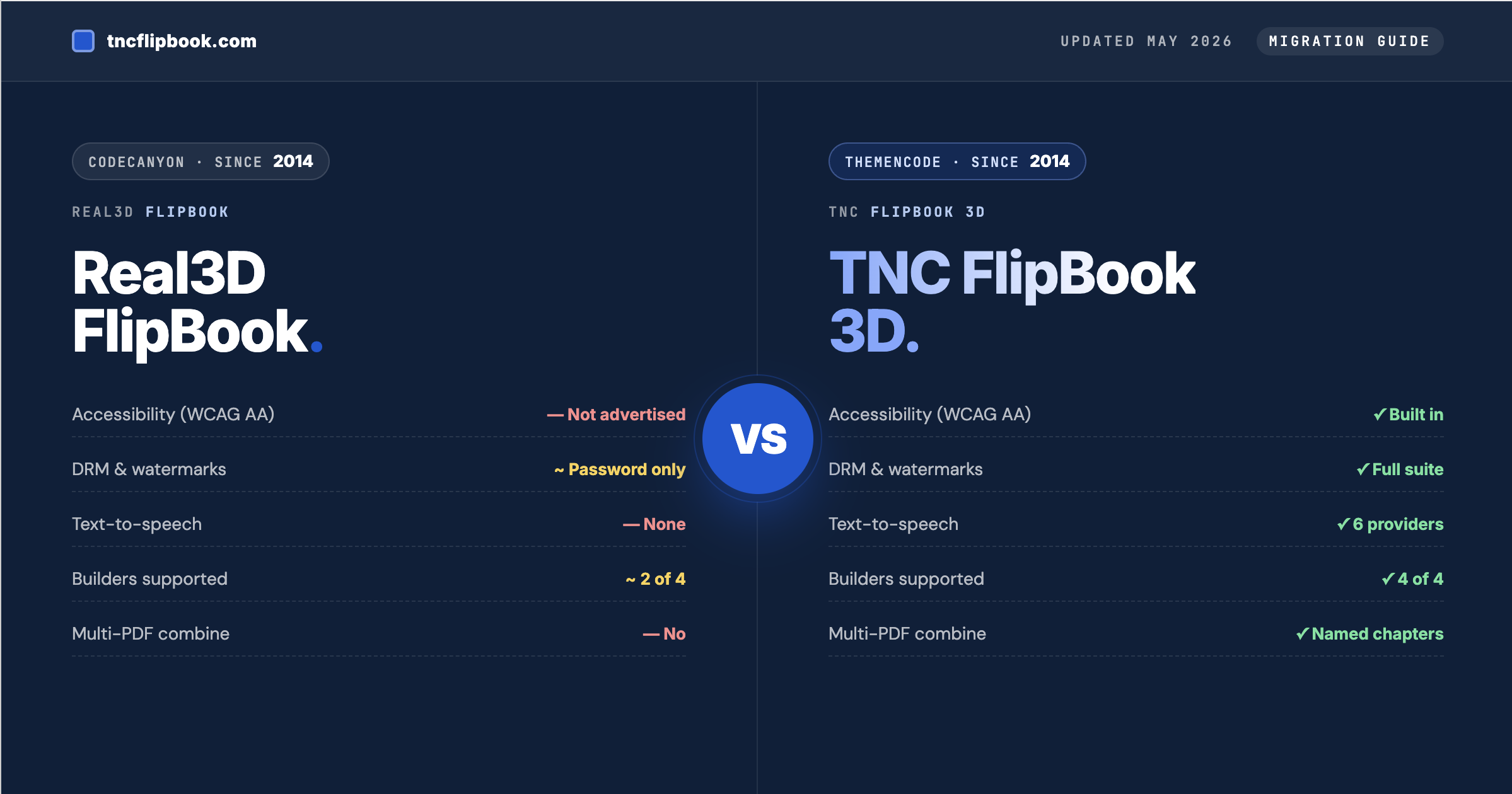
Both plugins render PDFs as 3D FlipBooks in WordPress. That is where the similarity ends. TNC FlipBook 3D is a more modern, more accessible, more secure plugin built around what publishers actually need today. Real3D is still a capable viewer, but its core has not had a major architectural revision in years, and several “must-have” features for modern publishing (accessibility, DRM, text-to-speech, monetization) are either missing entirely or require additional purchases on top of the base license. Real3D FlipBook vs. TNC FlipBook 3D is the comparison everyone has been waiting for. Let’s explore now:
| Capability | Real3D FlipBook | TNC FlipBook 3D |
|---|---|---|
| WebGL 3D page-flip | Yes | Yes (with refined physics) |
| 2D / CSS fallback | Yes | Yes (with 4 flip effects) |
| Built-in accessibility (WCAG 2.1 AA) | Not advertised | Yes |
| Read Aloud / Text-to-Speech | No | Yes (6 providers) |
| Content protection & watermarks | Password only | Full DRM suite |
| Per-page video overlays | Requires extra purchase | Built in |
| Multi-PDF combining | No | Yes |
| Visual hotspot editor | No | Yes |
| Gutenberg blocks | Basic | 3 blocks, full parameter parity |
| Page builder support | Elementor, WPBakery | Elementor, WPBakery, Avada / Fusion Builder, Divi |
| WooCommerce purchase gating | Requires extra purchase | Built in |
| Monetization (ad slots) | No | 6 slot types Addon |
| UI translations | RTL support | 194+ languages |
| Migration toolkit | N/A | 1-click import + auto redirects |
| Updates & support | One-time license, ad-hoc | Annual or Lifetime, included |
| Money-back guarantee | CodeCanyon refund policy | 7-day, no questions |
Short version: If you only need to flip a PDF, Real3D will do it. If you need accessibility compliance, real DRM, text-to-speech, in-FlipBook monetization, or you publish in non-English languages, TNC FlipBook 3D is the more complete platform — and our migration toolkit moves your existing FlipBooks across in a single click.
Why users are switching to TNC FlipBook 3D
1. Compliance and accessibility audits
2. Document protection that actually works
3. More than a PDF viewer
Viewer modes & rendering engine
| Viewer feature | Real3D FlipBook | TNC FlipBook 3D |
|---|---|---|
| WebGL 3D FlipBook | Yes | Yes — with refined corner-curl physics |
| CSS 3D / 2D fallback | Yes | Yes — with 4 effects: Realistic, Hard Cover, Slide, Fade |
| Vertical scroll viewer | Yes | Yes |
| Horizontal swipe viewer | Yes | Yes |
| Form-fill viewer with signature | No | Yes — fillable fields + signature capture, works on any PDF |
| Page curl intensity control | "Hardness" setting | Curl intensity, paper type, paper shininess, paper roughness |
| Flip duration control | Yes | Yes |
| Flip sound effects | Page-turn sound (single) | 13 built-in sound effects + custom upload |
| Render mode toggle | 3D / 2D switch | Auto / 3D / 2D CSS — per FlipBook or global |
| Render scale (quality control) | Not exposed | Yes — tune for high-DPI vs performance |
| Camera angle & distance | Camera angle | Distance, angle, FOV, book tilt |
| Hardcover / Spiral book styles | One default style | Default, Hardcover, Spiral — with 3D cover panels and spine |
| Image-only FlipBooks | Yes | Yes |
| Multi-PDF combine into one book | No — one PDF per FlipBook | Yes — named chapters, drag-to-reorder |
| Force single-page on mobile | Manual breakpoint | Automatic with override |
| Auto-fit zoom on resize | Manual breakpoint setup | Live recalculation on resize, orientation, page flip |
Form-fill mode: turn any PDF into a fillable, signable document
Real3D does not offer a form-fill mode at all. TNC FlipBook 3D ships a dedicated Form Viewer that handles both real fillable PDFs and flat documents: visitors can fill in fields, draw or type a signature, and then download or print the completed document. Crucially, this works even on PDFs that were never authored as real forms — the viewer lets users place text and a signature anywhere on the page, so a flat scan of a contract, a paper enrollment form, or an exported invoice can be completed and signed without ever leaving your site.
- Native fillable field support for PDFs that already contain form fields (text, checkboxes, radios, dropdowns)
- Signature capture — draw with finger or trackpad, or type and convert to a signature font
- Free-text and signature placement on any PDF, including non-form documents
- Download or print the completed PDF with all fills and signatures flattened in
- Toolbar toggle so visitors can switch between flipping and form-filling without reloading
This makes TNC FlipBook 3D a viable replacement for separate “fill and sign” plugins for use cases like contracts, waivers, application forms, school enrollment, and HR onboarding documents.
Design, themes & customization
Real3D ships with three predefined skins and lets you customize colors, the toolbar, and the background. That is the extent of the visual control without writing custom CSS.
TNC FlipBook 3D uses a layered theme model:
- 7 chrome palettes for the toolbar, sidebars, and popups: Slate, Paper, Midnight, Ocean, Forest, Glass (translucent frosted), and Sepia (warm cream for editorial reading). Each has built-in dark and light variants.
- Brand color picker — one hex value drives buttons, active icons, focus rings, progress, and accent highlights.
- Hardcover color picker — controls the wrap on Hardcover book style. Spine and bevels auto-derive.
- Default theme — Auto / Dark / Light. Users can still toggle at runtime unless you disable the toggle.
- Custom CSS — built-in editor with syntax highlighting. Global CSS applies inside every FlipBook viewer; per-FlipBook CSS loads after global styles.
- Custom logo — separate dark and light variants, configurable favicon for the standalone viewer URL.
Real3D requires an extra “themes” purchase or hand-written CSS to achieve any of this beyond the basics.
Admin experience: Real3D FlipBook vs TNC FlipBook 3D
The customer-facing viewer is only half of any FlipBook plugin. The other half is the admin panel where you spend your time configuring FlipBooks, tweaking settings, and building content. This is where the gap is most obvious the moment you open both plugins side by side.
Real3D’s admin panel has grown organically since 2014 and shows it: long single-column lists of fields with terse labels, a heavy use of “advanced” toggles that hide entire feature areas, dense rows of meta boxes stacked vertically, and inconsistent typography across the settings page, the per-FlipBook editor, and the page builder integrations. Common tasks like reordering pages, adding multiple PDFs, or previewing a color change require leaving the screen, scrolling, or saving and reloading.
TNC FlipBook 3D’s admin was redesigned from scratch with the WordPress block editor era in mind. Every screen follows a consistent visual system: clear section headings, generous spacing, descriptive helper text under every field, and inline previews where they matter.
| Admin task | Real3D FlipBook | TNC FlipBook 3D |
|---|---|---|
| Settings organization | Long single page, mixed concerns | Tabbed: General, Display, Toolbar, Protection, Integrations, Accessibility, Advanced |
| Per-FlipBook editor | Stacked metaboxes | Tabbed metabox: Content, Display, Toolbar, Protection, Read Aloud, SEO, WooCommerce, Advanced |
| PDF upload | Standard media field | Card / dropzone with thumbnail preview |
| Multi-PDF management | Not supported | Card list with drag-to-reorder handles, named chapters |
| Image gallery management | Standard repeater | A4-aspect previews, drag-to-reorder, contained fit |
| Color picker | Single hex input | Chrome palette swatches + brand color picker + live preview |
| Toggles | Native checkboxes | Modern on/off switches with helper text |
| Boolean / numeric controls | Plain inputs | Sliders, segmented controls, accordion groups where it helps |
| Language selector | Plain dropdown | Searchable dropdown across 194+ languages |
| Custom CSS field | Plain textarea | Editor with syntax highlighting and live refresh on tab change |
| Hotspot creation | Manual JSON or extra purchase | Visual click-to-place editor with action picker |
| Shortcode generator | Static example block | Live-updating builder with all parameters in one panel |
| Source-type guidance | None | Live notice when other source types have data, "View FlipBook" link |
| Welcome / onboarding | None | Dedicated welcome screen with guides, support links, and an FAQ |
Bottom line: Real3D's admin gets the job done if you already know what you are looking for. TNC FlipBook 3D's admin is built so a new user, a freelancer setting up a client site, or a team handing the plugin off between editors can find what they need without reading the documentation first.
Accessibility (WCAG 2.1 AA)
This is the single biggest functional gap between the two plugins. Real3D FlipBook does not publish an accessibility statement and the public feature list does not mention WCAG, ARIA, screen-reader testing, focus management, or keyboard shortcuts. For organizations subject to ADA, Section 508, AODA, or the European Accessibility Act, this is a blocker.
TNC FlipBook 3D was rebuilt with dedicated accessibility support that provides:
- Full keyboard navigation for every viewer mode (3D, 2D, vertical, horizontal, form-fill)
- ARIA roles and live regions for page changes, search results, and bookmarks
- Focus trapping for modals, sidebars, and popups
- Visible focus indicators that respect the user’s reduced-motion preference
- Documented keyboard shortcuts with an in-viewer help dialog
- Screen-reader-friendly page indicators (“Page 5 of 32”)
- RTL support that flips toolbars, navigation, and corner-curl direction automatically
If accessibility is a procurement requirement at your organization, TNC FlipBook 3D is the only one of the two plugins that can clear an audit without significant custom work. We are happy to share our internal WCAG conformance notes on request.
Read Aloud / Text-to-Speech
Real3D FlipBook does not include a Read Aloud feature.
TNC FlipBook 3D ships with a two-tier Text-to-Speech system covering both free and high-quality use cases:
- Browser TTS — uses the visitor’s built-in speech synthesis. Free, available on every modern browser, no per-character cost, but voice quality varies.
- Cloud TTS with pre-generated audio — supports Google Cloud TTS, Azure Cognitive Speech, Amazon Polly, ElevenLabs, OpenAI TTS. Audio is generated server-side from the Read Aloud admin tab, then cached on disk, so playback is instant for visitors and there is no per-visitor API cost.
- Sentence-level word highlighting as the audio plays
- Playback speed control and optional auto-flip when a page finishes reading
- Works with encrypted and password-protected PDFs — the text is extracted reliably even when the document blocks copy/paste
This is increasingly a default expectation for any FlipBook used in education, publishing, or accessibility contexts. It is also the kind of feature that, on Real3D, would require wiring up a third-party TTS service yourself in custom code.
Content protection & DRM
Real3D FlipBook offers password protection and the same generic right-click guard that ships with most PDF viewers. That is appropriate for casual gating, but it does not stand up to anyone determined to extract the PDF.
TNC FlipBook 3D’s content protection is a layered defense:
| Protection | Real3D FlipBook | TNC FlipBook 3D |
|---|---|---|
| Password gating | Yes | Yes |
| Text watermark (live) | No | Yes — opacity, rotation, repeat, position |
| Image watermark (live) | No | Yes — with width & opacity control |
| Burn watermark into download | No | Yes |
| Burn watermark into print | No | Yes |
| DevTools detection | No | Yes — with blur, warning, or no-action response |
| Print protection | No | Yes — can disable or watermark print |
| Screenshot deterrent | No | Yes — configurable on-screen message |
| Disable right-click / keyboard shortcuts | Yes | Yes |
| Disable image drag | No | Yes |
| Hide source PDF path | No | Yes — blob URL conversion |
| Secured PDF delivery (no direct file URL) | No | Yes |
Hotspots, video overlays & interactivity
Real3D supports interactive HTML content on pages, but adding hotspots requires an additional purchase. Even with it, hotspots are added through a form-based editor.
TNC FlipBook 3D includes a visual click-to-place hotspot editor built in. You upload your PDF, click anywhere on a page preview, and choose what should happen on visitor click:
- Info popup — rich text content in a styled modal
- Link / URL — opens a URL in same tab, new tab, or popup
- Jump to page — internal navigation
- Media — embed images, videos, or HTML snippets
Beyond hotspots, TNC FlipBook 3D includes:
- Per-page video overlays with positioning (X/Y/width/height percentages), autoplay, mute, loop, controls, draggable and resizable options
- Custom Table of Contents with manually-curated entries that override PDF outlines
- Notes & bookmarks with a sidebar UI
- Deep linking to specific pages via URL hash, with optional auto-scroll-to-page on first load
- PDF link overlay toggle — show or hide native PDF annotation links
Page builder, Gutenberg & WooCommerce
Real3D ships a Gutenberg block; Elementor, WPBakery, and WooCommerce support are sold separately.
TNC FlipBook 3D’s integration story is broader and the experience is more consistent across builders.
Gutenberg blocks (3, all included)
- FlipBook Embed — inline embed with width, height, page, language, transparent, and theme parameters
- FlipBook Popup Button — opens FlipBook in a styled popup
- FlipBook Popup Link — same popup behavior, but rendered as text link
All three blocks accept the same parameters as the shortcode, including nofollow, popup theme, autoplay, sound, and flip effect. There is no parameter parity gap to work around.
Page builder support
- Elementor — native widget category with a FlipBook picker
- WPBakery (Visual Composer) — native elements
- Avada / Fusion Builder — native elements (Real3D has no Avada support)
- Divi — native modules (Real3D has no Divi support)
Each integration ships three elements: FlipBook Embed, FlipBook Link (popup or new tab), and FlipBook Image (cover image link).
WooCommerce
- Link a FlipBook to a WooCommerce product
- Gate pages behind purchase — show a configurable preview limit, then a custom gating message
- Custom purchase redirect URL after preview limit is reached
- Automatic embed on the product page (no shortcode wrangling)
Real3D’s WooCommerce add-on offers basic linkage; the granular preview-limit-with-custom-message-and-redirect flow above is a TNC FlipBook 3D specific feature.
Monetization & analytics
Real3D FlipBook has Google Analytics integration. It does not include any in-FlipBook ad infrastructure or a self-hosted analytics dashboard.
TNC FlipBook 3D offers an optional Monetize add-on that handles six ad slot types covering the full reading lifecycle:
- Preroll — fullscreen ad before the FlipBook loads (skip delay, max duration, “show once” option)
- Banner — fixed top or bottom strip (configurable height, close button, responsive)
- Sidebar — side panel on desktop only (with a minimum-screen-width threshold and optional collapsible behavior)
- Overlay — shows on specific pages (configured via page list, with backdrop and close delay)
- InterPage — shows between flips at a configured frequency, with skip delay and max-shows limit
- Endroll — shows when the visitor reaches the last page
Each slot accepts arbitrary HTML, including embedded scripts (so it works with AdSense, direct sponsorships, custom HTML5 ads, or your in-house ad server).
For analytics, TNC FlipBook 3D ships GA4 integration in the core plugin. An optional Self-Hosted Analytics add-on provides an in-WordPress dashboard with charts for page views and events, plus configurable data retention — useful when third-party trackers are blocked or you operate in a privacy-sensitive jurisdiction.
Internationalization (194+ languages)
Real3D supports RTL languages and lets you customize toolbar text. That is the extent of its translation story — localizing the entire viewer UI is left to the site owner.
TNC FlipBook 3D ships translations for 194+ languages:
- Every label and message in the viewer UI is translatable, with dynamic values filled in at runtime (page numbers, totals, page names, and so on)
- 10 right-to-left languages automatically flip the entire interface — toolbars, sidebars, and even the corner-curl direction
- Admin panel strings translated through standard WordPress translation files
Adding a new language is a matter of dropping in a translation file and registering an entry in the language list — no code changes needed.
Developer extensibility: Real3D FlipBook vs TNC FlipBook 3D
| Developer feature | Real3D FlipBook | TNC FlipBook 3D |
|---|---|---|
| WordPress action / filter hooks | Limited | 60+ documented hooks |
| Public JS API | Limited | Yes — navigation, viewer state, event system |
| JS event system | Limited | Yes (page change, flip start, flip end, etc.) |
| REST API | No | Yes (analytics + extensibility endpoints) |
| Export / import FlipBooks | No | Yes — bundles attached media so FlipBooks can move between sites |
| Public developer documentation | Forum-based | Yes — published in the docs |
If you build sites for clients and need to extend a FlipBook plugin (custom analytics, custom protection, custom UI overlays, integrations into a CMS pipeline), TNC FlipBook 3D’s hook surface is the difference between “fork the plugin” and “drop in a small custom plugin.”
Migration toolkit: 1-click import from Real3D
Already running Real3D FlipBook? The TNC FlipBook 3D Migration Toolkit imports every existing FlipBook in a single click, with optional 301/302 redirects so your existing URLs keep working.
Migrate from Real3D FlipBook and experience the real feature-rich flipbook. The Migration Toolkit lives at WordPress Admin → Tools → FlipBook Migration and detects installed source plugins automatically. If Real3D FlipBook (or DearFlip, Interactive3D, or Classic PDF Viewer) is present and has FlipBooks in your database, a source card appears with the count of FlipBooks ready to import.
What gets carried over
- Title, status, slug, featured image (with fallback to the lightbox thumbnail), categories and author terms
- PDF source and image-gallery pages — the original PDF / image attachments are preserved
- View mode — each Real3D view mode (3D, swipe, scroll) mapped to the closest TNC FlipBook 3D equivalent
- Page mode and force-single-page-on-mobile
- RTL flag (mapped to an Arabic language hint), sound, and flip duration
- Skin (light / dark) mapped to the closest color scheme + color mode
- Logo image and toolbar visibility for 13 buttons (download, print, share, fullscreen, search, thumbnails, bookmarks, sound, autoplay, single-page, zoom, info, social)
- Page indicator and side-navigation arrows
What does not migrate (and what to do about it)
Some Real3D-specific settings have no direct equivalent. The migrator records what was skipped on each imported FlipBook so you can review:
- Real3D-specific 3D camera, lighting, and book-physics settings — configure these via TNC FlipBook 3D’s Camera & Scene tab. Most defaults look better out of the box.
- Lightbox / popup launcher buttons on pages around the site — recreate them with the FlipBook Link or Image-Link block / shortcode (the migrator cannot find them automatically because they live in post content, not FlipBook records).
- Per-FlipBook custom CSS and analytics snippets — these are flagged for manual review.
- Page-by-page hyperlinks and embedded media defined inside Real3D’s Page Editor — recreate as TNC FlipBook 3D hotspots (visual editor handles this in seconds).
Automatic 301 / 302 redirects
The migrator includes a redirect option (checkbox plus a 301/302 selector inside the migrate form). When enabled, every imported FlipBook stores a redirect from its original Real3D URL to its new TNC FlipBook 3D URL, and incoming visits are forwarded automatically with the status code you chose.
Manage the redirects under Tools → FlipBook Migration → Redirects: add manual entries, toggle individual rows on/off, bulk delete, or clear the entire map. Existing inbound links from Google, social shares, partner sites, and old emails keep working without you editing a single page.
Source detection is database-driven
Source cards only appear when matching FlipBook posts actually exist in your database. Deleting the source plugin’s posts hides its card automatically; uninstalling the plugin alone is not enough, because the migrator reads the data directly from the database. That means the source plugin can stay active or be deactivated during import — either works.
Estimated time to migrate
- Under 50 FlipBooks: 2–5 minutes including the redirect pass
- 50–500 FlipBooks: 5–15 minutes
- 500+ FlipBooks: 15–45 minutes (the migrator processes in batches; the page can be left open or closed)
Recommendation: run the migration on a staging site first if you have more than a hundred FlipBooks. The migrator is non-destructive (Real3D data stays in the database), so you can import to staging, smoke-test a handful of imported FlipBooks, then run the same import on production with the redirect option enabled.
Real3D customer? Claim your loyalty upgrade discount.
If you already own a Real3D FlipBook license, we will give you a special discount on your first year of TNC FlipBook 3D as a thank-you for switching. Fill in the short form below and our team will verify your purchase and email you a one-time discount code, usually within one business day. Renewals after year one are billed at the regular rate.In a hurry? Go ahead and purchase TNC FlipBook 3D at the regular price right now. Submit this form afterwards with your TNC FlipBook 3D order number, and once we verify your Real3D purchase we will refund the first-year discount amount to your original payment method. You will never pay more than the discounted price either way.
Who should switch — and who probably should not
Switch to TNC FlipBook 3D if:
- You publish in non-English languages or your audience is multilingual
- You need to demonstrate accessibility compliance (WCAG, Section 508, AODA, EAA)
- Your FlipBooks contain sensitive content that needs DRM beyond a password
- You publish educational, magazine, or catalog content where Read Aloud, multi-PDF combining, custom Table of Contents, or per-page videos add real value
- You want WooCommerce purchase gating or in-FlipBook monetization
- You build sites for clients and want a FlipBook plugin with a documented developer surface
- You are running on Avada / Fusion Builder or Divi (Real3D has no support for either builder)
- You prefer plugins with a clear update cycle, included support, and a money-back guarantee
Stay with Real3D FlipBook if:
- You have a single English-language FlipBook, no accessibility requirements, no DRM requirement, and no plans to extend the plugin
- You have already invested significantly in custom Real3D code and the migration cost outweighs the feature gap (uncommon — the migrator handles the bulk of the work)
- You only need the lightweight CodeCanyon-style one-time-purchase model and are comfortable receiving updates only as long as the original developer continues to release them
Ready to make the switch?
Unlock the full TNC FlipBook 3D feature set with an annual or lifetime license. The Migration Toolkit moves your Real3D FlipBooks across in one click, with optional 301/302 redirects to keep your URLs intact.
Frequently asked questions
Will switching from Real3D FlipBook break my existing URLs?
No. The Migration Toolkit includes optional 301/302 redirects from the old Real3D URL to the new TNC FlipBook 3D URL. Inbound links from Google, social, partner sites, and old emails continue to work without you editing a thing. You can also disable any redirect individually if needed.
Do I have to deactivate Real3D FlipBook before importing?
No. The migrator reads Real3D’s data directly from your WordPress database, so Real3D can stay active during the migration. We recommend deactivating it only after you have verified the imported FlipBooks look correct, so you can safely roll back if something looks off.
Can I run TNC FlipBook 3D and Real3D FlipBook side by side?
Yes. The two plugins use different post types and different shortcodes ([real3dflipbook] vs. ) so they do not collide. This is the recommended setup during a staged migration.
What happens to my Real3D Page Editor hotspots during import?
The migrator preserves the underlying PDF and the imported FlipBook works immediately, but Real3D Page Editor’s interactive elements (which live in a different data structure) are flagged for manual recreation. The TNC FlipBook 3D visual hotspot editor handles this in seconds per page — click on the page preview, choose action type, save.
Does TNC FlipBook 3D include accessibility out of the box?
Yes. WCAG 2.1 AA accessibility, keyboard navigation, ARIA roles, focus management, and screen-reader support are built in. We treat accessibility as table stakes, not as an upsell.
Do I have to buy extras to match what Real3D's bundle does?
No. Hotspots, video overlays, custom Tables of Contents, page-limit gating, WooCommerce integration, and GA4 analytics are all included in the core TNC FlipBook 3D plugin. Optional add-ons cover specialized use cases: Monetize (ad slots), Self-Hosted Analytics (in-WordPress dashboard), AI Chatbot, Lead Capture, SEO & AI Search, and PDF Stamper. Page builder support for Elementor, WPBakery, Avada / Fusion Builder, and Divi ships through companion plugins.
How do I keep getting updates and support?
TNC FlipBook 3D Pro is sold on an annual or lifetime license model, both of which include updates and support. The 7-day money-back guarantee covers your first purchase — if the plugin does not work for you, request a refund and we will process it without questions.
Where can I see TNC FlipBook 3D in action before deciding?
Visit our demo gallery on tncflipbook.com to interact with live FlipBooks across different content types: magazines, catalogs, educational books, restaurant menus, and accessibility-focused publications.